Built for people who wear more than one hat
Be ready to sell—even when you’re in the middle of doing the work.
Your Quote Assistant keeps the Lead, communication history, next step, original quote, and practical responses together—plus one-tap Call and Directions—so you can switch into sales mode without rebuilding the conversation in your head.
- Capture a new Lead while it is warm—or bring your current opportunities with you.
- Open the customer history and original quote, then Call or get Directions in a tap.
- Use practical phone, text and email responses—and tailor them to sound like you.
$10.75/month, billed annually at $129. Cancel renewal anytime · 30-day money-back guarantee

For people who sell byquote, estimate, bid or proposal
Field & service work
Real estate & automotive
Consulting & professional services
The real YQA workspace
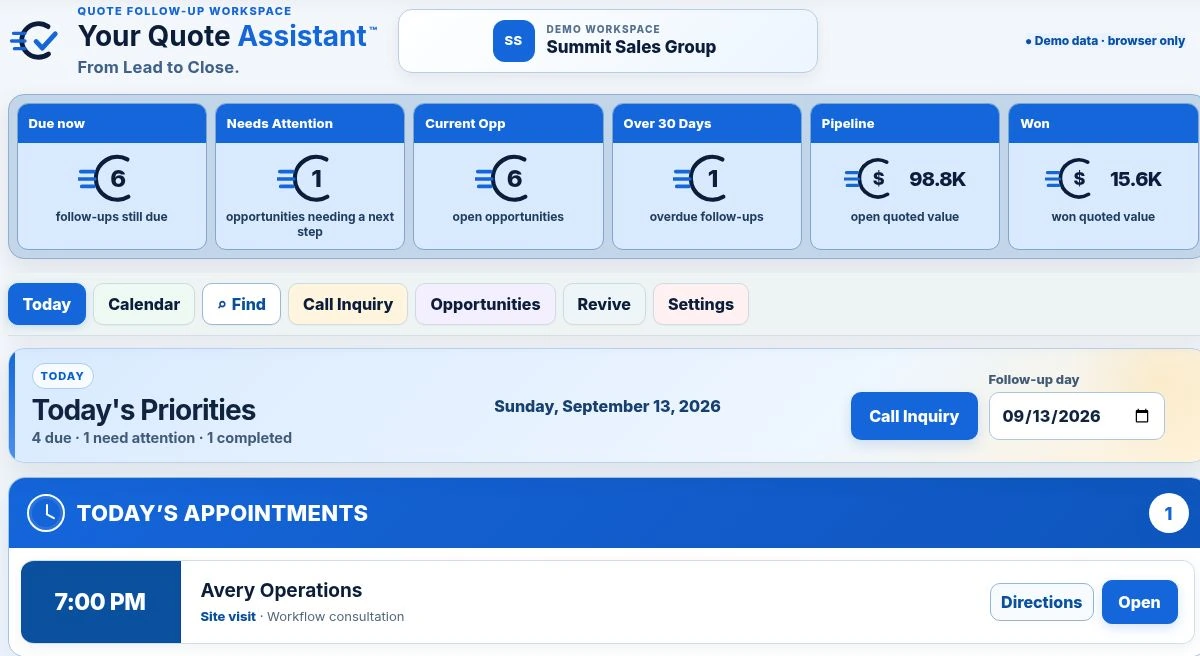
Know what needs attention. Know what to do next.
Today brings due follow-ups, incomplete opportunities and completed work into one focused view. This is the actual product interface—not a marketing mockup.
The hard part is the mental switch
The phone does not wait until you are ready to become the salesperson.
YQA on your phoneKnow what to say next.
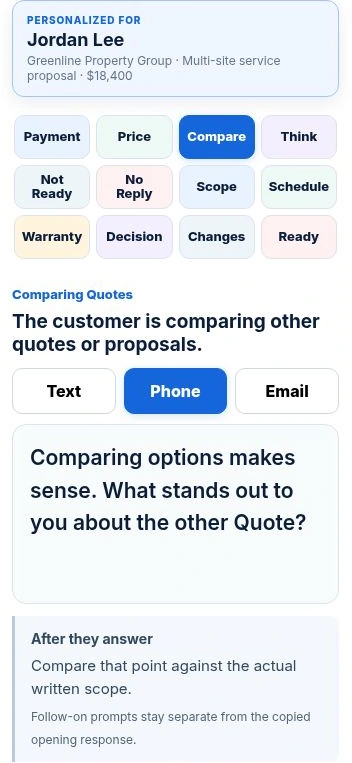
You may be on a job, solving a problem, supervising somebody or driving between appointments when a prospect calls. In seconds you have to stop wearing one hat and start selling. Later it is easy to think, “I forgot to say that,” or “I should have answered that differently.”
YQA keeps the customer context, communication history, next step, original document and practical responses close at hand—so you can handle the conversation and get back to the rest of your day.
- See the communication history before you answer the next question.
- Open the original quote and practical responses without searching through other apps.
- Call the customer or open Directions, then return to the work you were doing.
Complete feature list
Everything Your Quote Assistant does.
A practical lead-to-close workspace: broad enough to manage the whole opportunity, focused enough to use every day.
01
START THE RECORD
Capture & Find
- Call Inquiry quick capture from phone or computer
- Save a Lead before a quote amount or date exists
- Customer name, business and contact details
- Job, service or project details
- Complete street address fields
- Lead source and preferred contact method
- Priority and customer situation
- One-click link to the original quote, estimate, bid or proposal
- Find by person, business, service or notes
- Use your preferred term: quote, estimate, bid or proposal
02
RUN THE DAY
Today & Calendar
- Today’s priorities in one working view
- Needs Attention queue for opportunities without a next step
- Due and overdue follow-ups
- Calendar follow-up view
- Previous, today and next-date navigation
- Next action and follow-up scheduling
- Completed Today checkbox workflow
- Useful pipeline and work scorecards
- Financial privacy controls
- Follow-up timing defaults
03
KNOW WHAT TO SAY
Customer Responses
- Responses personalized to the customer and opportunity
- Phone, text and email versions
- Primary response plus practical alternatives
- Price, payment and comparison concerns
- Timing, hesitation and no-response follow-up
- Email subject lines and optional signature
- Customer-name personalization on or off
- Create custom categories and responses
- Copy or open the selected response in a click
04
MOVE IT TO AN OUTCOME
Opportunities & Control
- Track the opportunity from Lead through close
- Open, won, lost and archived status
- Full activity history
- Revive using your 30, 60 or 90-day setup choice
- Age-specific Revive response libraries
- Import current opportunities by CSV
- Downloadable CSV import template
- Export a CRM-ready CSV
- Work from phone or computer
- Business and company settings
- Instructions on/off
- Delete a record with confirmation
Field to desk, without losing the thread
Use the phone while you’re moving. Use the computer when you sit down.
Capture and respond during the day. Review histories, prepare follow-up and work through older opportunities later from the computer. The same opportunity stays organized in one focused workspace.
Phone-first captureComputer-friendly reviewOne continuous customer record

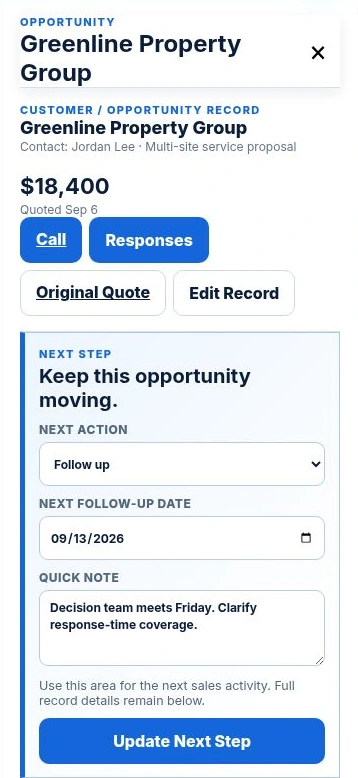
The YQA difference
When the customer hesitates, you won’t have to invent the answer on the spot.
Start with practical phone, text and email language for the exact customer and situation. Edit the included wording or add your own responses and categories. YQA personalizes the selected message, and you remain in control of what is sent.
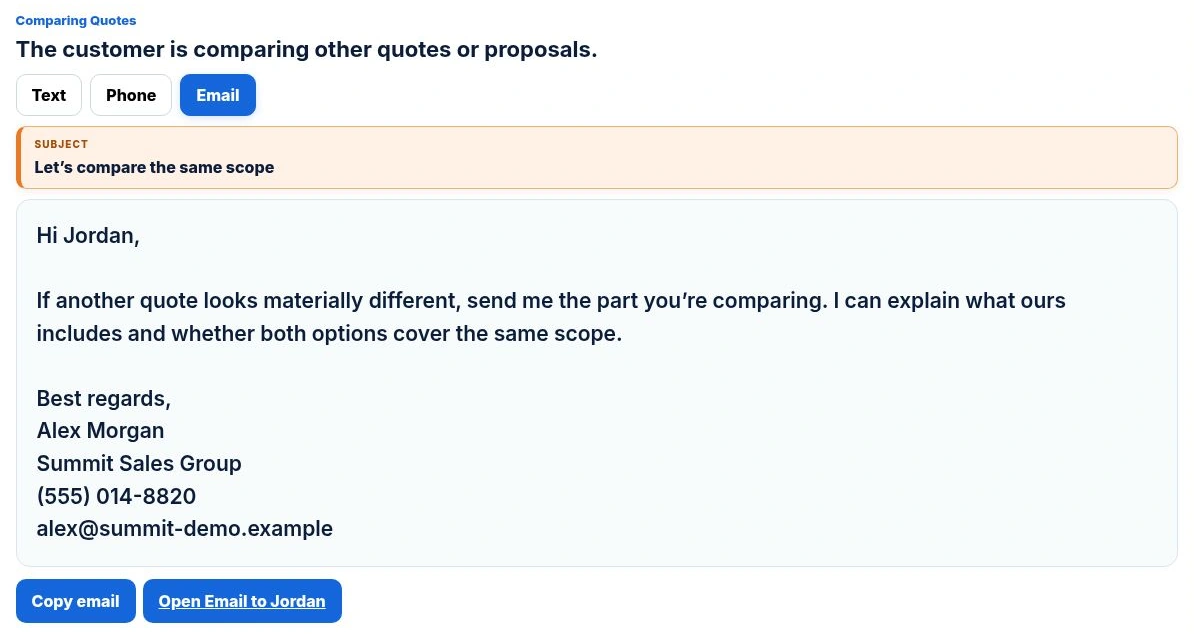
YQA on your phone · Text
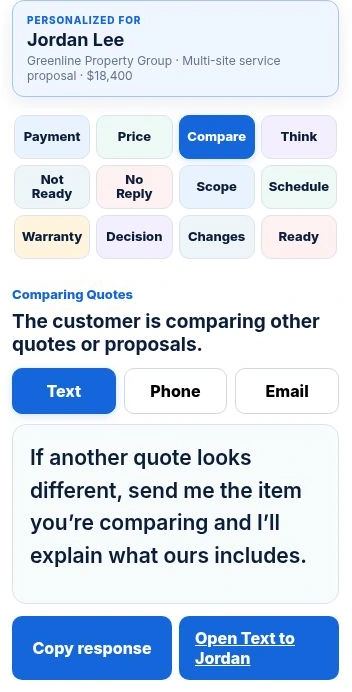
You review before anything is sent.
More than a dashboard
See the relationship—not just another name in a pipeline.
Keep the customer, their need, quoted value, response history and next follow-up together.
OPPORTUNITIES
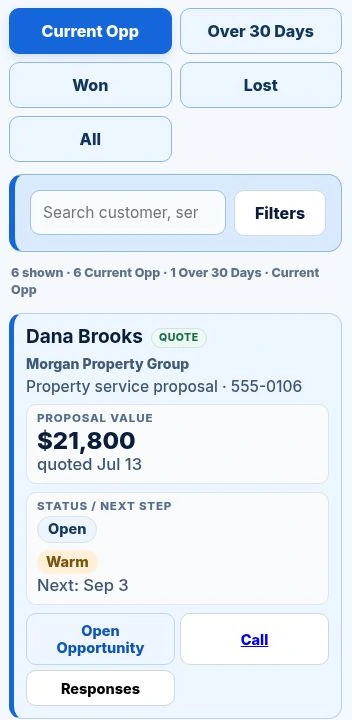
Your working opportunity list.
Search, filter and move from Lead to quoted opportunity to final outcome while keeping the next action visible.
- Lead and quoted records together
- Value, status and next step at a glance
- Responses available from the record
Your working list, in your pocketOpportunities on mobile
REVIVE
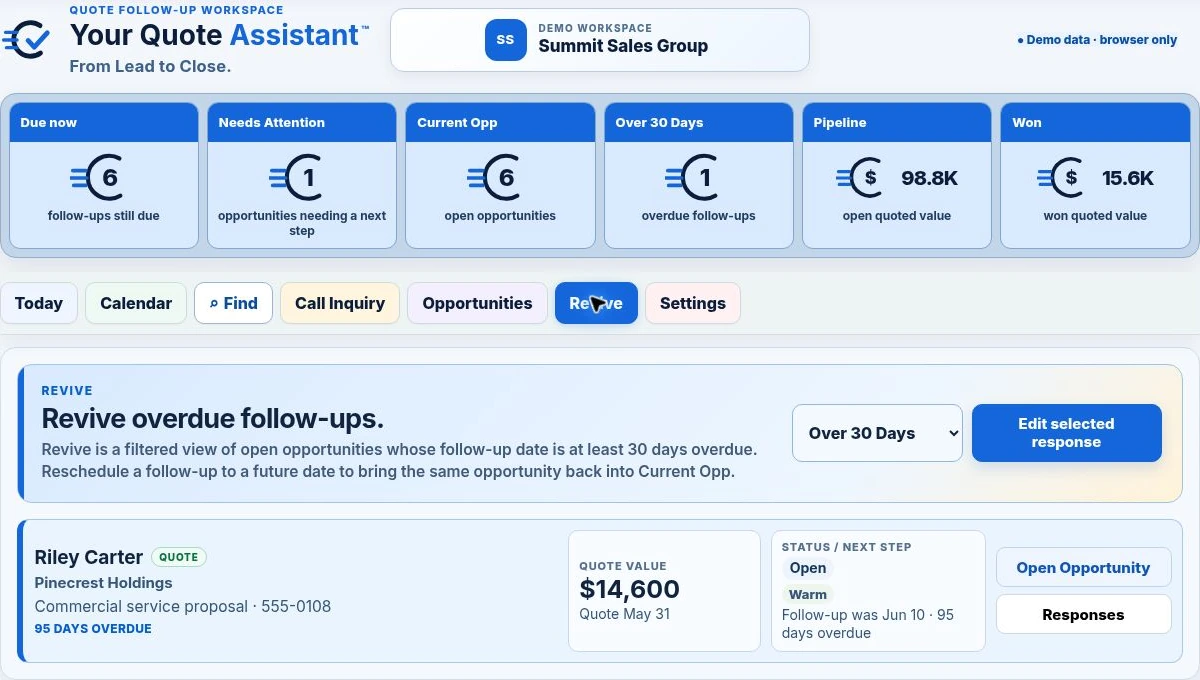
The customer never said no.
Bring older Leads, quotes, estimates, bids or proposals back into view with age-specific language to restart the conversation.
- Over 30, 60 or 90 days, based on your setup
- Text, phone and email previews
- Editable restart responses
Different businesses. The same follow-up problem.
Built for anyone who wins work by quote, estimate, bid or proposal.
The work may look different, but the pressure is the same: serve today’s customer while keeping tomorrow’s opportunity moving.

REAL ESTATE
Between showings, offers and listing appointments.

AUTOMOTIVE SALES
When every conversation competes for attention.

PROFESSIONAL SERVICES
Keep proposals and next steps moving between client work.
Capture opportunities while you’re already on a job.
Keep calls, site visits, estimates and follow-up from disappearing between tasks.
Keep larger bids moving through longer decision cycles.
Track comparison shoppers, revisions and next steps without losing the thread.
Move from property visit to estimate to follow-up.
Keep job addresses, customer context and the next action together in one record.
Keep estimates and offers moving while the shop or lot stays busy.
Follow up without searching through texts, paper notes or yesterday’s calls.
Manage proposals without adopting another giant platform.
Keep the client situation, proposed work, next action, follow-up date and outcome visible.
Turn follow-up discipline into a repeatable process.
See what needs attention instead of depending on whoever remembers first.
Choose the right-sized system
More useful than scattered notes. Far less complicated than a full CRM.
YQA is built specifically for the daily work of moving an opportunity from first inquiry to final outcome.
What you needNotes & spreadsheetsYour Quote AssistantFull CRM
Capture a Lead before a quote existsManual setupBuilt inUsually
See what needs attention todayRequires upkeepBuilt inRequires configuration
Customer-specific phone, text and email ResponsesNoCore featureVaries by platform
One-click link to the original quote, estimate, bid or proposalSearch across files or programsBuilt into every opportunityVaries or requires setup
Revive older Leads and opportunitiesManual searchingDedicated workflowRequires filters or campaigns
Comfortable daily use from a phonePossibleDesigned for itVaries
Setup and administrationLow, but fragmentedFocused and lightTypically higher
Import and export opportunity dataManual filesBuilt inUsually
General comparison of common approaches. Individual CRM features and configurations vary by provider.
You already have opportunities out there
Start with the opportunities you already have.
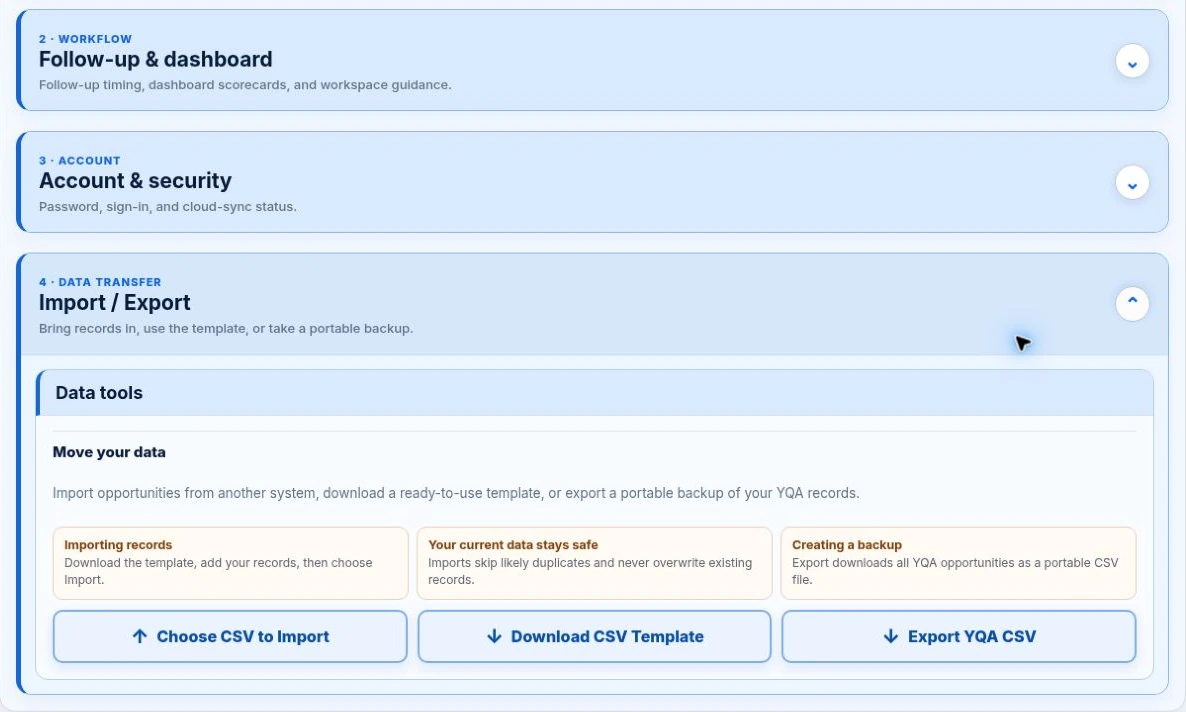
Download the YQA CSV template, add your current leads and quoted opportunities, and import them into your workspace. When you want your data elsewhere, export a CRM-ready CSV and take it with you.
Import current opportunitiesDownload the templateExport anytimeYour data stays portable
✓
RISK-FREE
30
DAYS
MONEY-BACK
GUARANTEE
Put it to work with less risk
Use YQA in your real workday.
If it is not useful for managing your opportunity follow-up, request a refund within 30 calendar days of purchase.
The guarantee covers the purchase price. It does not guarantee revenue, sales or another business result.One focused annual plan
Put a real system behind every opportunity you worked to earn.
Everything you need to capture, respond, follow up and revive—from your phone or computer.
Call InquiryToday follow-up queueOpportunity recordsPhone, text & email ResponsesReviveCalendar & FindCSV import & exportPhone + computer access
Clear answers before you buy
Questions, answered.
Who is Your Quote Assistant built for?
YQA is built for professionals who personally win work by quote, estimate, bid or proposal—including field and service businesses, real-estate and automotive professionals, consultants, independent salespeople and other proposal-based work.
Is YQA a CRM?
No. YQA is a focused lead-to-close follow-up workspace. It helps you capture opportunities, respond, schedule next actions, follow up and revive older conversations without the setup and administration of a full CRM. It can also complement an existing CRM through import and export.
Can I use YQA before I have prepared a quote or proposal?
Yes. Call Inquiry lets you capture the customer and opportunity while the Lead is still warm—even when there is no amount or quote date yet—then record the next action so it does not disappear from view.
How do the Phone, Text and Email Responses work?
Open the customer’s opportunity, choose the situation and review the primary response or alternatives. YQA personalizes the selected response for that customer, then opens the phone, text or email action you choose. You review it and remain in control of what is sent.
Can I change the included responses or add my own?
Yes. You can edit the included response library, choose which response is primary, add alternatives, create your own categories and add responses that match the way you do business.
Does YQA send messages or make calls for me?
YQA keeps you in control. It prepares the response and opens the phone, text or email action you choose. You review it and make the final decision before anything is sent or a call is placed.
Can I open the original quote, estimate, bid or proposal from YQA?
Yes. Each opportunity can include a link to the original document, so you can open it with one click instead of searching through files or jumping between programs while you are with a customer.
Can I use YQA on both my phone and computer?
Yes. YQA works in a modern web browser on your phone and computer, and your cloud workspace stays available across devices. No app-store download is required.
Can I import or export my information?
Yes. YQA includes a downloadable CSV import template and a CRM-ready CSV export so your opportunity information remains portable. It is file-based portability rather than an automatic live connection to another CRM.
What is included for $10.75/month?
The complete YQA workspace is $10.75 per month, billed annually at $129. Access begins immediately after purchase; this is an annual plan, not a month-to-month payment option. It renews yearly until canceled and is backed by a 30-day money-back guarantee.